BB6BET registration: how sign-up worked and what can go wrong
Sign-up with a Google account, a phone number or an OTP worked in our test. This guide covers what to check first, what to do when sign-up fails, and what to keep private.
Independent site, not the official BB6BET website · 18+ · Last updated: 3 October 2026 · Hands-on test: 2 October 2026
Short answer
In our test on 2 October 2026, sign-up worked with a Google account, a phone number or an OTP (one-time code). Verified We do not list exact screens or fields because they can change and we cannot confirm them. Before you register, know that betting apps are being declared illegal in Pakistan: see the legal status page.
Before you register
- Check the law where you live. For Pakistan, start with the legal status page.
- Confirm the address. Read it letter by letter. Look-alike domains are common.
- Read the terms and privacy policy, especially withdrawal, bonus and account-closure rules.
- Decide your limit now, before any deposit, and write it down.
What we could and could not confirm
| Google sign-up | Worked in our test Verified |
|---|---|
| Phone number sign-up | Worked in our test Verified |
| OTP verification | Worked in our test Verified |
| Exact fields and screens | Not confirmed Unverified |
| ID (KYC) checks | Often asked before a first withdrawal on such services; not confirmed here Unverified |
| Minimum age | We require 18+ here. The service’s own rule is not verified Unverified |
| Sign-up bonus | A promotions section is shown in the app; no offer is verified as current Unverified |
| Referral codes | Some links carry one, and we may earn a commission from referral links Reported |
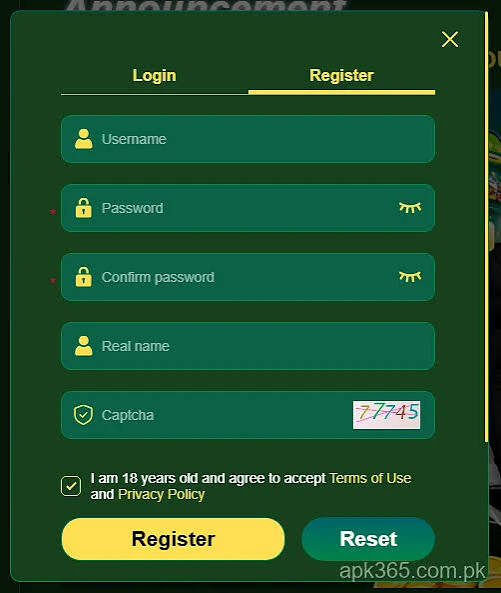
Choosing how to sign up
- Google account: check the address before choosing Google sign-in and look at what access you are granting. Use an account you control. Afterwards you can review it in your Google account’s third-party access settings.
- Phone number: use your own number and keep your SIM and phone locked.
- OTP: the code proves it is you, so never read it out or forward it.
Pick one method and remember it. Signing in later with a different method may create a second account, which causes trouble with balances and withdrawals.
When registration fails
- The code does not arrive: the same checks apply as at login, so see missing OTP codes.
- Your number is rejected: check the digits and the format, and make sure you are not mixing a country code with a leading zero. If it still fails we cannot tell you why, because we cannot see the service’s rules. Screenshot the error and ask live chat.
- “Already registered”: you probably have an account, maybe made with another method. Try logging in. Do not make a second account to get around it, since many services ban duplicates.
- The Google sign-in loops or fails: check you are online and that the right Google account is chosen on the phone.
What to protect, and red flags
Use a unique password. Give only what is needed, and be careful about ID photos and selfies to a service you cannot identify. Use your own details, never someone else’s.
- An “agent” offers to register you or hold your account.
- You are asked to pay a fee to activate or verify an account.
- You are sent to a payment page before you see any terms.
- You are pushed to deposit fast to “claim” a bonus.
Next: the login guide and, before any deposit, the payments guide.
Questions about registration
How do I register for BB6BET?
In our test, sign-up worked with a Google account, a phone number or an OTP. Screens can change, so follow the on-screen steps and read the terms before you submit anything.
The app says my phone number is already registered.
You probably have an account already, possibly made with a different sign-in method. Try logging in instead. Do not create a second account to get around it.
My phone number is rejected.
Check the digits and country format first. If it still fails we cannot say why, because we cannot see the service's rules. Contact in-app live chat and keep a screenshot of the error.
What documents will I need?
We could not verify this. Many services ask for ID before a first withdrawal. Confirm who receives your documents before sending any.
Can I have more than one account?
We could not verify the rules. Many services ban duplicates, which can put withdrawals at risk.